For plumbers
A plumbing estimate and invoice app for solo plumbers
Say the job, text the number, get paid to your own account.
Settle lets a solo plumber describe a job out loud and get a priced, line-by-line estimate in seconds, using the prices from their own past jobs. You text it from your own phone, the customer approves or pays from a link, and the money goes to your own Stripe account. It's free to send unlimited estimates and invoices, and it's iPhone only.
What a plumbing estimate looks like
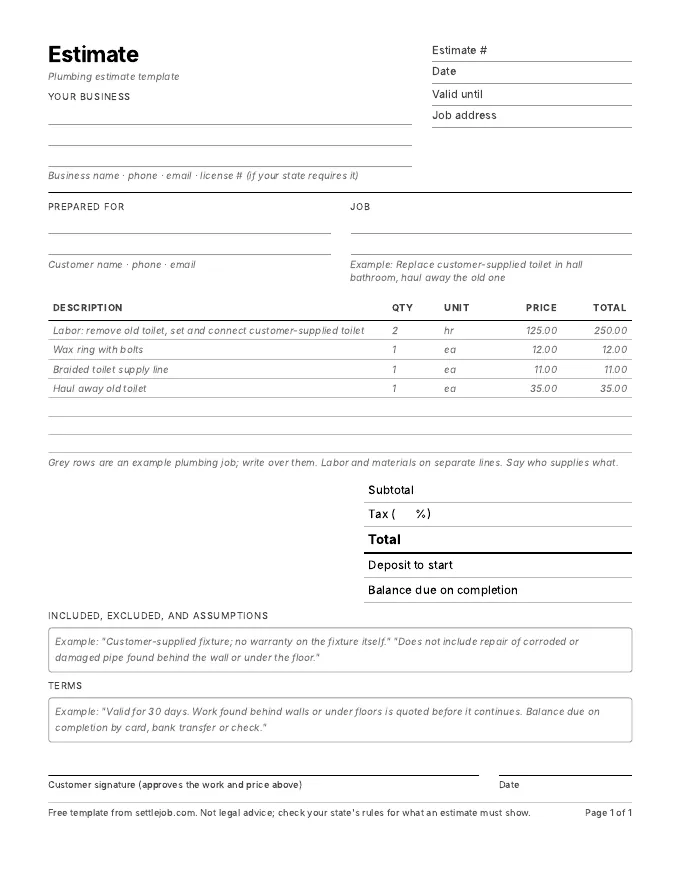
You stand in the bathroom and say: "Replace the toilet. Customer bought the new one. New wax ring, new supply line, haul the old one away." Settle writes:
| Line | Qty | Price | Total |
|---|---|---|---|
| Labor: remove old toilet, set and connect customer-supplied toilet | 2 hr | $125.00 | $250.00 |
| Wax ring with bolts | 1 | $12.00 | $12.00 |
| Braided toilet supply line | 1 | $11.00 | $11.00 |
| Haul away old toilet | 1 | $35.00 | $35.00 |
| Total before tax | $308.00 |
Example prices only. Settle uses your own prices, and marks any it had to guess with an orange dot.
What matters in plumbing estimates
- Say who supplies the fixture. Customer-supplied fixtures change your warranty and your markup. Put it on the line.
- List what's included. Shutoff valves, supply lines, haul-away, disposal. These are the lines customers argue about later.
- Write down what you can't see. "Does not include repair of corroded or damaged pipe found behind the wall." One sentence saves an argument.
- Check local permit rules. Water heater and repipe work often need permits, and the rules vary by city. Put a permit line on the estimate when one applies.
- Show your license number. Enter it once in Settings and it prints on every estimate and invoice. Check your state licensing board for what must appear.
How Settle handles plumbing work
There's no price catalog to build before your first estimate. Settle writes the lines and the wording, and your prices come from what you charged before: send one estimate with "wax ring, $12" and the next one remembers it. After a few jobs the orange dots mostly disappear. Your customer gets a page with your business name and license number and one button, Approve on an estimate or Pay on an invoice. You see "Viewed", "Approved" and "Paid" next to the job.
What it doesn't do: scheduling, dispatch, GPS or time tracking, and there's no Android or web version. If you run a crew with a dispatcher, see the comparison with Jobber and Housecall Pro.
Plumbing questions
What is the best estimate app for a solo plumber?
For a solo plumber with an iPhone who wants no document caps and payments to their own account, Settle. For a plumbing company with several techs that needs scheduling and dispatch, Jobber or Housecall Pro are built for that.
Can I quote a plumbing job from my phone without typing?
Yes. Tap the orange button, describe the job out loud, and Settle writes the priced estimate. You can edit any line before you send it.
How do I get paid for a plumbing job on the spot?
Convert the approved estimate to an invoice with one tap, text it, and your customer pays by card, Apple Pay or bank transfer from the link. The payment goes to your own Stripe account.
Quote your next plumbing job by talking.
Free on iPhone. Unlimited estimates and invoices. 7 days of Pro to try the voice drafts, and you cancel in two taps.
Download on the App StoreiPhone, iOS 17 or later. Questions? Text Nina: (818) 945-9686