For carpet cleaners
A carpet cleaning estimate and invoice app
Count the rooms, note the stains, and send the price before you bring in the hoses.
Settle fits carpet cleaning because the price gets settled in the living room. Walk the house, say the rooms, stairs and treatments out loud, and Settle writes a priced estimate from your own rates. Text it from your own phone, the customer approves from a link, and when you're done they pay by card or bank to your own Stripe account. Sending unlimited estimates and invoices is free. It's iPhone only and doesn't do scheduling or route planning.
What a carpet cleaning estimate looks like
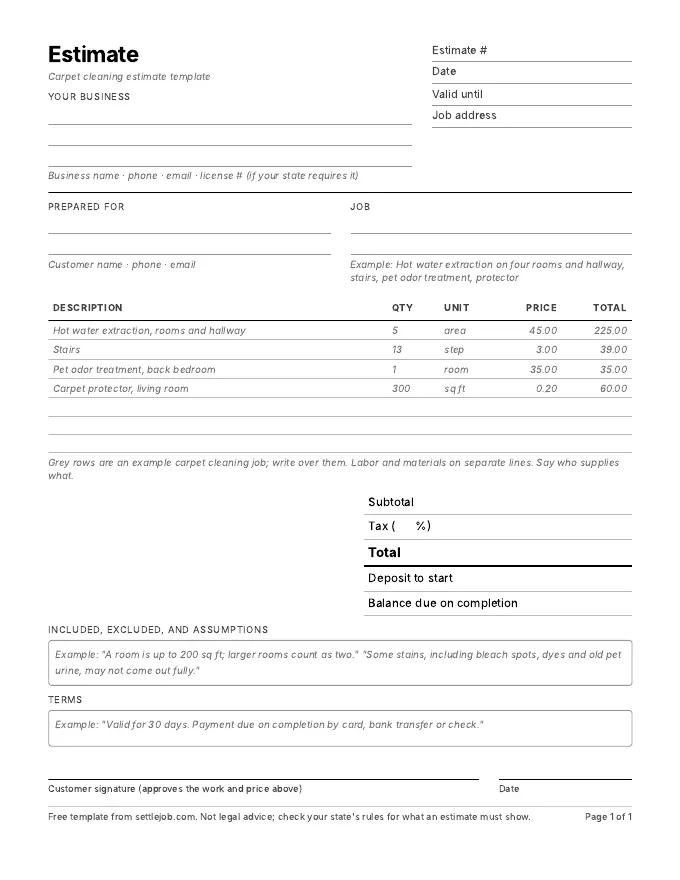
In the hallway you say: "Hot water extraction on four rooms and the hallway, one flight of stairs with thirteen steps, pet odor treatment in the back bedroom, and protector on the living room." Settle writes:
| Line | Qty | Price | Total |
|---|---|---|---|
| Hot water extraction, rooms and hallway | 5 areas | $45.00 | $225.00 |
| Stairs | 13 steps | $3.00 | $39.00 |
| Pet odor treatment, back bedroom | 1 room | $35.00 | $35.00 |
| Carpet protector, living room | 300 sq ft | $0.20 | $60.00 |
| Total before tax | $359.00 |
Example prices only. Settle uses your own rates, and marks any price it had to guess with an orange dot.
What matters in carpet cleaning estimates
- Say what counts as a room. Many cleaners cap a room at a size, such as 200 square feet, and count a large living room as two. Put the rule on the estimate so the customer isn't surprised.
- Treatments on their own lines. Pet odor, heavy spotting and protector cost you product and time. Separate lines let the customer choose.
- Write down what you won't promise. "Some stains, including bleach spots, dyes and old pet urine, may not come out." This is the line that prevents the callback.
- Say what the customer handles. Small items, breakables and things on the floor picked up; furniture moving, if you charge for it, on its own line.
- Drying time. Tell them how long to stay off the carpet. It's not a price line, but it's part of a good estimate.
What Settle does for carpet cleaners, and what it doesn't
It's built for quoting in the house. Describe the work, fix any price with an orange dot, and tap Send: Messages opens with the text written, the estimate link and the PDF attached, from your own number. You see when the customer opens it and when they tap Approve. After the job, one tap turns the estimate into an invoice with a pay link. The money lands in a Stripe account in your name; Settle takes no cut and never holds it.
Settle doesn't book jobs, plan routes, or track a crew. There's no Android or web version. If you run several vans with techs, a field-service tool like Jobber is built for that; compare them on the comparison page.
Carpet cleaning questions
What is the best estimate app for a solo carpet cleaner?
For a one-van operator on an iPhone who prices on site, Settle is free to send unlimited estimates and invoices, writes the estimate from what you say using your own rates, and pays to your own Stripe account. If you need online booking, routing and crew dispatch, Jobber or Housecall Pro are built for that.
Can I price per room and per square foot on the same estimate?
Yes. Each line has its own quantity and unit, so rooms, steps and square feet can sit on the same estimate. You can edit any of them.
Can Settle draft an estimate from photos?
Yes. Take up to 3 photos and Settle uses them, along with what you say, to draft the estimate. The photos stay with the job in the app; they aren't added to the PDF or the estimate page your customer sees.
How do I get paid when I finish?
Turn the estimate into an invoice and send it before you leave. The customer pays from the link by card, Apple Pay or bank, and the money goes to your own Stripe account.
Quote your next clean by talking.
Free on iPhone. Unlimited estimates and invoices. 7 days of Pro to try the voice drafts, and you cancel in two taps.
Download on the App StoreiPhone, iOS 17 or later. Questions? Text Nina: (818) 945-9686