For HVAC techs
An HVAC estimate and invoice app for solo techs
Your flat-rate prices, written up and texted before you leave the unit.
Settle lets a solo HVAC tech describe a repair out loud and get a priced estimate that uses their own flat-rate prices, remembered from jobs they've already sent. You text it from your phone, the customer approves or pays from a link, and the money goes to your own Stripe account. Sending unlimited estimates and invoices is free. It's iPhone only and has no dispatch or scheduling.
What an HVAC estimate looks like
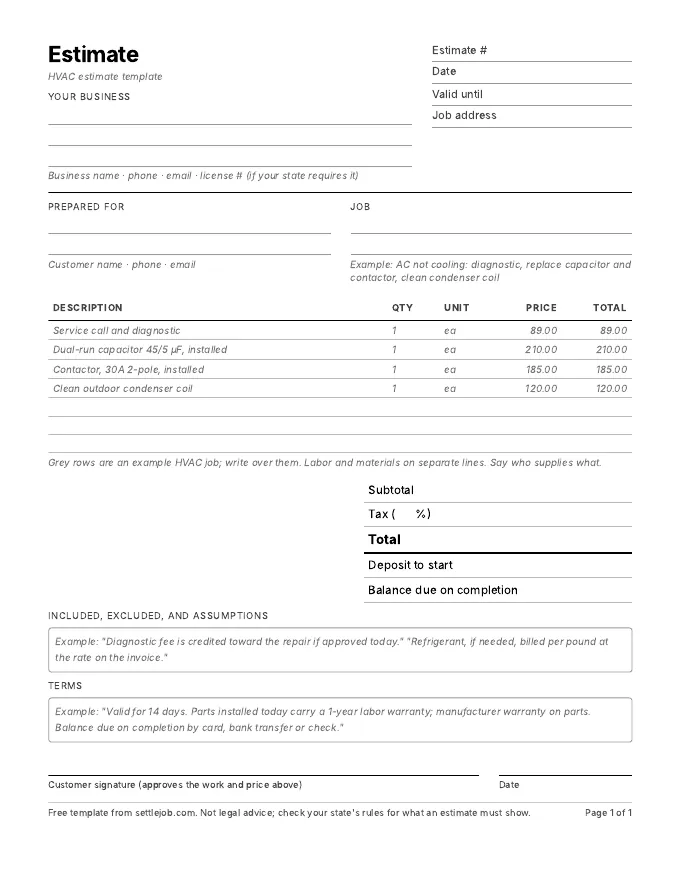
Standing at the condenser you say: "AC not cooling. Bad dual-run capacitor and contactor on the outdoor unit. Replace both and clean the coil." Settle writes:
| Line | Qty | Price | Total |
|---|---|---|---|
| Service call and diagnostic | 1 | $89.00 | $89.00 |
| Dual-run capacitor 45/5 µF, installed | 1 | $210.00 | $210.00 |
| Contactor, 30A 2-pole, installed | 1 | $185.00 | $185.00 |
| Clean outdoor condenser coil | 1 | $120.00 | $120.00 |
| Total before tax | $604.00 |
Example prices only. Settle uses your own prices, and marks any it had to guess with an orange dot.
What matters in HVAC estimates
- Flat rate, not a lump sum. Many techs price from a flat-rate book. Each repair is a line at your price, so the customer sees what they're paying for. Once you've sent "capacitor, installed, $210", Settle remembers it for next time.
- Say whether the diagnostic fee is credited. If it's applied to the repair when the customer says yes, put it on the estimate.
- Refrigerant as its own line. If you add refrigerant, list the type and the amount. It makes a recharge's price understandable.
- For replacements, spell out the equipment. Model, efficiency rating, warranty terms, and whether the price includes the pad, line set and permit.
- Be fast in peak season. On a 105-degree day the customer is calling three companies. The tech who texts a clear number from the driveway often gets the job.
How Settle handles HVAC work
You don't load a pricebook first. Describe the job, fix any orange-dotted prices, and send. Your prices are remembered from what you send, so the second capacitor estimate comes back at your number. The customer opens a page with your business name and license number and taps Approve or Pay. You see "Viewed" the moment they open it.
What it doesn't do: dispatch, scheduling, service agreements or recurring maintenance billing, and it has no Android or web version. Techs with a crew should look at Jobber or Housecall Pro; see the comparison.
Worth knowing
EPA rules under Section 608 of the Clean Air Act require technicians who maintain, service, repair or dispose of equipment that could release refrigerant to be certified. If your estimates include refrigerant work, your certification is worth mentioning: it tells the customer the job is being done legally.
HVAC questions
Can I use my own flat-rate prices in Settle?
Yes. Settle uses the prices you've charged before. It doesn't invent them, and any price it has to guess is marked with an orange dot until you confirm it.
What is the best invoice app for a one-man HVAC business?
For a one-person shop on an iPhone that wants no document caps and payments to its own account, Settle. For HVAC businesses with several techs that need dispatch and scheduling, Jobber or Housecall Pro are built for that.
Does Settle work with no signal in a crawlspace or attic?
You can write and edit an estimate with no signal, and it saves as you go. You need a connection to send it, and AI drafts need one too.
Sources
Quote your next service call by talking.
Free on iPhone. Unlimited estimates and invoices. 7 days of Pro to try the voice drafts, and you cancel in two taps.
Download on the App StoreiPhone, iOS 17 or later. Questions? Text Nina: (818) 945-9686