Guide · Estimates
Free change order template for contractors
The job changed. Write it down, put a price on it, and get a yes before you do the extra work.
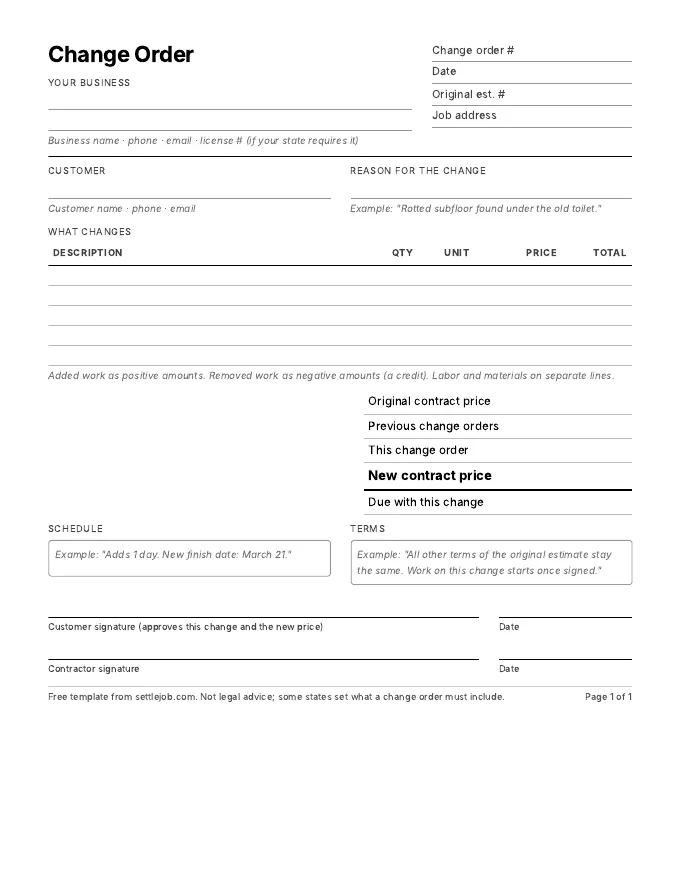
A change order is a short signed agreement that changes the scope or price of a job you already agreed on. It should name the original estimate, say why the work changed, list the added or removed work with prices, show the original price, the change, and the new contract price, say whether the schedule moves, and have the customer's signature and date. Get it approved before you do the extra work. The template below has every field, free, with no sign-up.
Download the template
Download the PDF (US Letter, 1 page)
Print it and fill it in on site, or type over it in any PDF app. Fields for the original estimate number, the reason, five line items, the running contract price, the schedule change, terms, and signatures for you and the customer.
When you need a change order
- You found something you couldn't see. Rotted subfloor under the toilet, a corroded line behind the wall, a breaker panel that won't take another circuit.
- The customer asks for more. "While you're here, can you also…" is a change order, even if it's small.
- The customer asks for less. Dropping work is a change too. Write the credit down so the final invoice matches what they expect.
- The materials change. A different fixture, a pricier tile, a part that's back-ordered and has to be swapped.
A good rule: if the final invoice would surprise the customer without it, write one.
What a change order shows
- The original estimate number and date, so it's clear which agreement it changes.
- The reason, in one plain sentence. "Rotted subfloor found under the old toilet."
- The work, line by line, with quantity and price. Added work as positive amounts, removed work as a credit.
- The running total: original price, earlier change orders, this change, and the new contract price. Customers lose track after the second change; this keeps everyone on the same number.
- The schedule: does the finish date move, and by how much.
- Payment: is anything due now, or does it roll into the final invoice.
- Signatures and dates from the customer, and from you.
Some states set rules for changes to home improvement contracts, such as requiring them in writing and signed. Check your state contractor board.
How to get it approved on the spot
Stop when you find the problem, show the customer, and price it while you're both standing there. A photo of the rotted subfloor and a number in writing gets a faster yes than a call that evening. Don't start the extra work on a verbal OK; if there's a dispute later, "you said it was fine" is hard to prove.
In Settle, you can say the extra work out loud and send it as its own estimate from your phone; the customer taps Approve on the link, and Settle records their name and the time. Duplicate copies an estimate with its customer and lines, which is a quick start when the change is close to the original. Settle doesn't have a separate change order form, so if you need the running contract total on one page, use the template above.
What is a change order in construction?
A written agreement, signed by the customer and contractor, that changes the scope, price or schedule of work already agreed on. It modifies the original contract instead of replacing it.
Does a change order need to be signed?
It should be. A signature and date is your proof the customer agreed to the extra cost. Some states require changes to home improvement contracts to be in writing and signed.
Can I charge for extra work without a change order?
You can try, but it's the most common source of payment disputes. Without a signed change, the customer can argue they only agreed to the original price.
What's the difference between a change order and a new estimate?
A new estimate is a separate job. A change order modifies a job already in progress and shows how the original price changes. For small add-ons, a separate approved estimate for the extra work often works just as well.
Price the extra work by talking, and send it from your phone.
Free on iPhone. Unlimited estimates and invoices. 7 days of Pro to try the voice drafts, and you cancel in two taps.
Download on the App StoreiPhone, iOS 17 or later. Questions? Text Nina: (818) 945-9686