For junk haulers
A junk removal estimate and invoice app
Eyeball the pile, call the load, and send a price the customer can approve before you start loading.
Settle fits junk removal because the price gets set standing in front of the pile. Say the load size and any surcharge items out loud and Settle writes a priced estimate from your own rates. Text it from your own phone, the customer approves from a link before you start loading, and when the truck's full they pay by card or bank to your own Stripe account. Sending unlimited estimates and invoices is free. It's iPhone only and doesn't do scheduling or dispatch.
What a junk removal estimate looks like
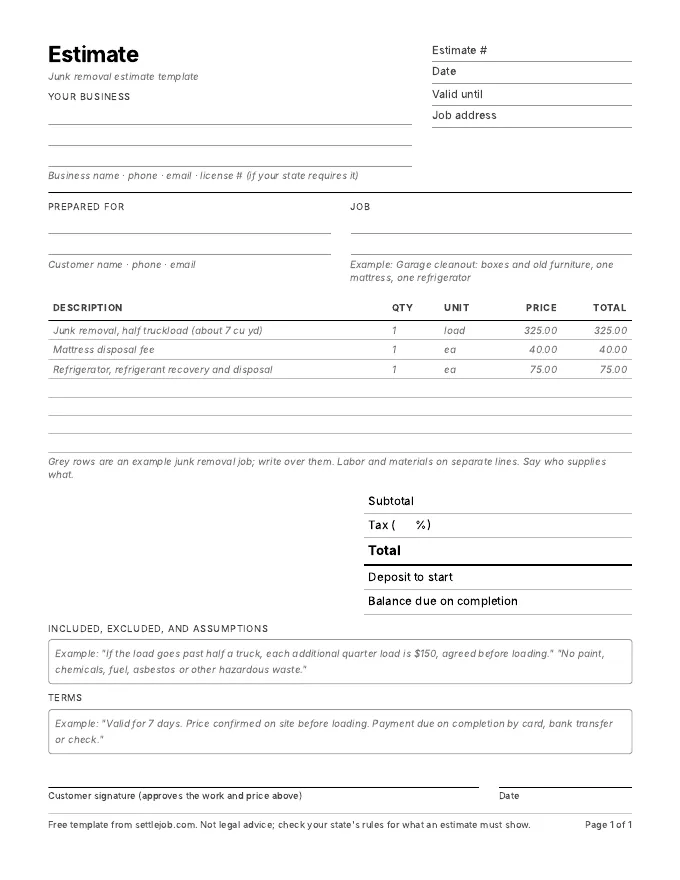
In the garage you say: "Half a truckload, mostly boxes and old furniture. One mattress, one fridge, and about ten feet of carry from the back of the garage." Settle writes:
| Line | Qty | Price | Total |
|---|---|---|---|
| Junk removal, half truckload (about 7 cu yd) | 1 load | $325.00 | $325.00 |
| Mattress disposal fee | 1 ea | $40.00 | $40.00 |
| Refrigerator, refrigerant recovery and disposal | 1 ea | $75.00 | $75.00 |
| Total before tax | $440.00 |
Example prices only. Settle uses your own rates, and marks any price it had to guess with an orange dot.
What matters in junk removal estimates
- Quote the load size, not just a number. "Half truckload, about 7 cubic yards" lets the customer see what they're paying for, and gives you room to adjust if the pile is bigger than it looked.
- Say what happens if it's more. One line, such as "If the load goes past half a truck, each additional quarter is $150," avoids an argument at the tailgate.
- List surcharge items on their own lines. Mattresses, appliances with refrigerant, tires, and paint often cost you more at the dump or recycler. Separate lines show why the price went up.
- Write down what you won't take. Hazardous waste, chemicals, and anything your local transfer station refuses. Name them on the estimate.
- Get the yes before you load. Once it's in the truck, the price conversation is harder. A tap on Approve takes the customer ten seconds.
What Settle does for junk haulers, and what it doesn't
It's built for pricing the job in front of you. Describe the pile, fix any price with an orange dot, and tap Send: Messages opens with the text written, the estimate link and the PDF attached, from your own number. You see when the customer opens it and when they tap Approve. When you're done, one tap turns the estimate into an invoice with a pay link. The money lands in a Stripe account in your name; Settle takes no cut and never holds it.
Settle doesn't book jobs, plan routes, or dispatch trucks. There's no Android or web version. If you run several trucks with crews, a field-service tool like Jobber is built for that; compare them on the comparison page.
Junk removal questions
What is the best estimate app for a solo junk removal business?
For a one-truck operator on an iPhone who prices on site, Settle is free to send unlimited estimates and invoices, writes the estimate from what you say using your own rates, and pays to your own Stripe account. If you need online booking, dispatch and routing, Jobber or Housecall Pro are built for that.
Can I price by the fraction of a truckload?
Yes. Say "half a truckload" or "a quarter load" with your price, or let Settle use what you charged last time. You can edit the description, quantity and price on every line.
Can Settle draft an estimate from photos?
Yes. Take up to 3 photos and Settle uses them, along with what you say, to draft the estimate. The photos stay with the job in the app; they aren't added to the PDF or the estimate page your customer sees.
How do I get paid at the end of the job?
Turn the estimate into an invoice and send it before you pull away. The customer pays from the link by card, Apple Pay or bank, and the money goes to your own Stripe account.
Quote your next haul by talking.
Free on iPhone. Unlimited estimates and invoices. 7 days of Pro to try the voice drafts, and you cancel in two taps.
Download on the App StoreiPhone, iOS 17 or later. Questions? Text Nina: (818) 945-9686