For fence builders
A fence estimate and invoice app
Walk the line, say the footage, and send the price while the customer is still standing in the yard.
Settle fits fence work because the price comes from walking the line. Say the footage, style, tear-out and gates out loud and Settle writes a priced estimate from your own rates. Text the estimate from your own phone, the customer approves from a link, and when the job's done they pay by card or bank to your own Stripe account. Sending unlimited estimates and invoices is free. It's iPhone only and doesn't do scheduling.
What a fence estimate looks like
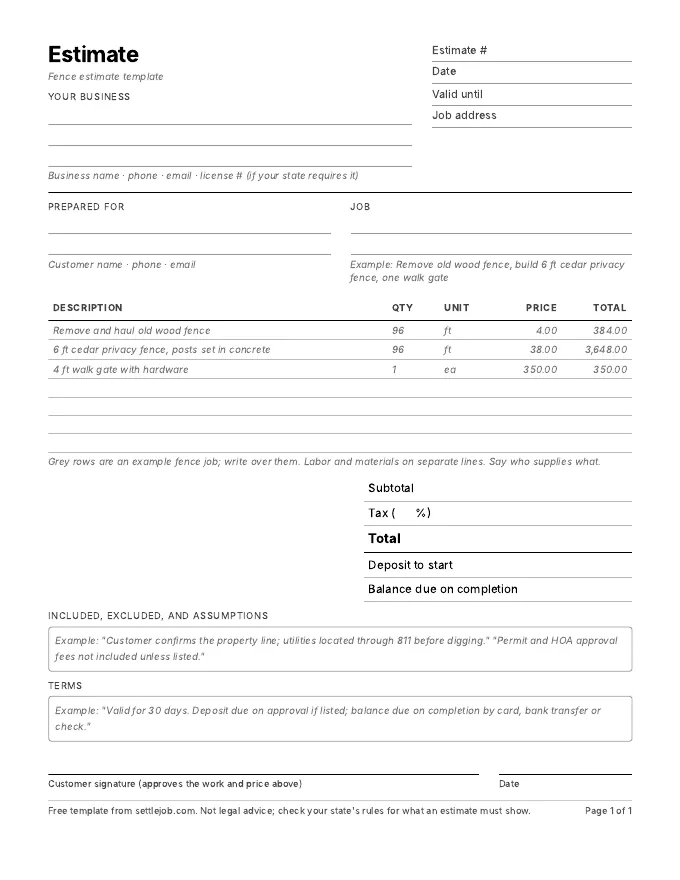
Walking the property line you say: "Tear out 96 feet of old wood fence, build 96 feet of six-foot cedar privacy fence with posts set in concrete, and one four-foot walk gate." Settle writes:
| Line | Qty | Price | Total |
|---|---|---|---|
| Remove and haul old wood fence | 96 ft | $4.00 | $384.00 |
| 6 ft cedar privacy fence, posts set in concrete | 96 ft | $38.00 | $3,648.00 |
| 4 ft walk gate with hardware | 1 ea | $350.00 | $350.00 |
| Total before tax | $4,382.00 |
Example prices only. Settle uses your own rates, and marks any price it had to guess with an orange dot.
What matters in fence estimates
- Price by the linear foot and name the style. "96 ft of 6 ft cedar privacy" can be checked with a tape measure.
- Gates are their own line. They take more time and hardware than a section of fence.
- Say who marks utilities and the property line. Call 811 before digging, and put on the estimate that the customer confirms where the property line is.
- Permits and HOA approval. Say who gets them and whether the fee is included.
- Rock and roots. Note what happens if you hit rock or large roots when setting posts.
What Settle does for fence builders, and what it doesn't
Walk the line, say the footage, the style, the tear-out and the gates, and check any price marked with an orange dot. The estimate goes out from your own number while the customer is still in the yard. Add a deposit line for materials, collected with an invoice pay link. You see when the customer opens and approves it. Payments land in a Stripe account in your name; Settle takes no cut and never holds the money.
Settle doesn't schedule jobs, order materials, or track a crew. There's no Android or web version. If you run several crews, a field-service tool like Jobber is built for that; compare them on the comparison page.
Worth telling the customer
811 is the FCC-designated national number for "call before you dig." Locating underground utility lines is free, and you call a few business days before digging; how many depends on your state. Saying on the estimate who calls 811 protects you and the customer.
Fence questions
What is the best estimate app for a solo fence builder?
For a one-person fence builder on an iPhone who prices on site, Settle is free to send unlimited estimates and invoices, writes the estimate from what you say using your own rates, and pays to your own Stripe account. If you need material takeoffs and crew scheduling, a field-service tool is built for that.
Should I take a deposit on a fence job?
Usually, to cover materials, within your state's limit. California caps home improvement down payments at $1,000 or 10%, whichever is less. See how much deposit to ask for.
Can Settle draft an estimate from photos?
Yes. Take up to 3 photos and Settle uses them, along with what you say, to draft the estimate. The photos stay with the job in the app; they aren't added to the PDF or the estimate page your customer sees.
Sources
Quote your next fence by talking.
Free on iPhone. Unlimited estimates and invoices. 7 days of Pro to try the voice drafts, and you cancel in two taps.
Download on the App StoreiPhone, iOS 17 or later. Questions? Text Nina: (818) 945-9686