For electricians
An electrician estimate and invoice app for solo electricians
Quote the job from the panel, with your license number on it.
Settle lets a solo electrician describe a job out loud and get a priced estimate in seconds, with the contractor license number they entered printed on every estimate and invoice. You text it from your phone, the customer approves or pays from a link, and the money goes straight to your own Stripe account. It's free to send unlimited documents, and it's iPhone only.
What an electrician's estimate looks like
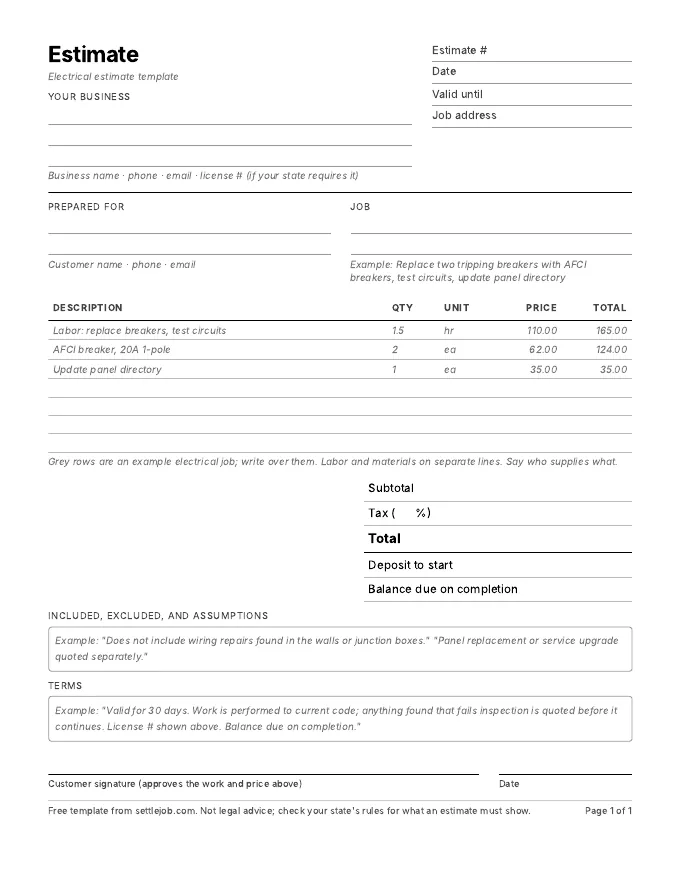
At the garage panel you say: "Replace two AFCI breakers, panel in the garage. Test the circuits and update the panel directory." Settle writes:
| Line | Qty | Price | Total |
|---|---|---|---|
| Labor: replace breakers, test circuits | 1.5 hr | $110.00 | $165.00 |
| AFCI breaker, 20A 1-pole | 2 | $62.00 | $124.00 |
| Update panel directory | 1 | $35.00 | $35.00 |
| Total before tax | $324.00 |
Example prices only. Settle uses your own prices, and marks any it had to guess with an orange dot.
What matters in electrical estimates
- Your license number on every document. Enter it once in Settings and it prints on every estimate and invoice. Check your state licensing board for what must appear.
- Separate labor, materials and permit fees. Customers accept a permit line when it's shown on its own.
- Say who pulls the permit and who schedules the inspection. Panel and service work often needs both, and the rules vary by city.
- List what the code requires you to replace. If an inspector or your own findings add work, put it on a separate line so the customer can see why the price moved.
- Use your minimums. If you charge a trip or minimum-visit fee, make it its own line.
How Settle handles electrical work
There's no catalog to build. Describe the work, check the orange-dotted prices, and send. Settle remembers your prices from what you send, so "AFCI breaker, 20A" comes back at your number the next time. Your customer opens a page with your business name, license number and line items, and taps Approve or Pay. You see "Viewed" when they open it.
What it doesn't do: scheduling, dispatch, time tracking or job costing, and there's no Android or web version. If you have employees, compare it with Jobber and Housecall Pro on the comparison page.
Electrician questions
Does Settle put my license number on estimates?
Yes. Enter your contractor license number in Settings and it appears on every estimate and invoice, and on the page your customer opens.
What is the best estimate app for a solo electrician?
For a solo electrician with an iPhone who wants quick estimates, no document caps and payments to their own account, Settle. For an electrical contractor with a crew that needs scheduling and job costing, Jobber, Housecall Pro or similar field-service tools fit better.
Can customers pay a large electrical invoice by bank transfer?
Yes. Your customer can pay by card, Apple Pay or bank transfer from the invoice link. Stripe's bank-transfer rate is 0.8% with a $5 maximum, against 2.9% + 30¢ for cards, paid to Stripe.
Quote your next electrical job by talking.
Free on iPhone. Unlimited estimates and invoices. 7 days of Pro to try the voice drafts, and you cancel in two taps.
Download on the App StoreiPhone, iOS 17 or later. Questions? Text Nina: (818) 945-9686